| commit | 9dbf6e833461d47ce04e69a706287b95f379e087 | [log] [tgz] |
|---|---|---|
| author | Marc Kupietz <kupietz@ids-mannheim.de> | Thu Feb 12 17:20:52 2026 +0100 |
| committer | Marc Kupietz <kupietz@ids-mannheim.de> | Sat Feb 14 15:58:02 2026 +0100 |
| tree | 230e68755f93158b5de8f0aedff9e133f52b3d59 | |
| parent | d8f38397ed8394e882d9027d258f1577ac4b9f6c [diff] |
Bump version to 0.4.0

Change-Id: I1b6f9fee30a125fc7f071fb59afc5cf5a244a5e2
Kalamar-Plugin-Export
Description
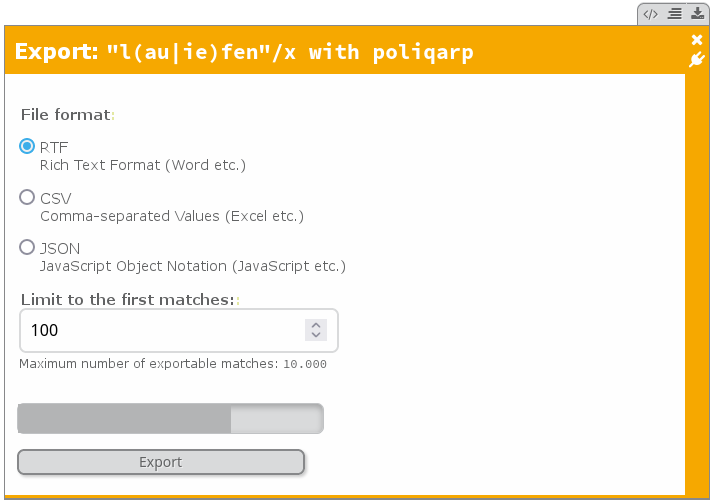
Kalamar-Plugin-Export is a web service that integrates in the plugin framework of Kalamar, to export matches for the KorAP Corpus Analysis Platform in various formats. Currently supported are RTF, CSV, and JSON.
Kalamar-Plugin-Export is meant to be a basic export plugin and should demonstrate and evaluate the plugin capabilities of Kalamar.
Prerequisites
Java 17 (OpenJDK or Oracle JDK), Git, Maven 3. Further dependencies are resolved using Maven.
Build
To build the latest version of Kalamar-Plugin-Export, do ...
git clone https://github.com/KorAP/Kalamar-Plugin-Export
cd Kalamar-Plugin-Export
... and build the jar file ...
mvn clean package
Afterwards the jar file is located in the target/ folder and can be started with ...
java -jar KalamarExportPlugin-[VERSION].jar [-h|--help]
Per default, this will start a server at http://localhost:7777. It will also create a subfolder files to temporarily store created exports.
Registration of the plugin in Kalamar is not yet officially supported. Registration works by passing the following JSON blob to the plugin registration handler.
{
  "name" : "Export",
  "desc" : "Exports Kalamar results",
  "embed" : [{
    "panel" : "result",
    "title" : "exports KWICs and snippets",
    "icon" : "\uf019",
    "classes" : ["button-icon", "plugin" ],
    "onClick" : {
      "action" : "addWidget",
      "template" : "http://localhost:7777/export",
      "permissions":["forms","scripts","downloads"]
    }
  }]
}
This template will also be displayed when starting the jar with the argument [-h|--help]. Alternatively it is returned by:
http://localhost:7777/export/template
At the moment the simplest way to register the plugin is by storing the json blob in a file (the blob needs to be in a list, i.e. surrounded by [...]). The file then can be loaded using the Plugins addon in Kalamar using the Kalamar configuration file.
{
  Kalamar => {
    plugins => ['Plugins'],
  },
  'Kalamar-Plugins' => {
    default_plugins => 'plugins.json'
  }
}
For example, with this configuration addition, the content of plugins.json will be registered on every Kalamar page load.
An example demo showcases the embedded plugin.
At the moment the integration reuses the session of the host service. To make this possible, the Content Security Policy of Kalamar needs to be extended to include the whole domain that hosts both services (at the moment it's not possible to host the service on a different domain). If the domain is, e.g., ids-mannheim.de, the configuration in the Kalamar configuration file needs to be:
{
  CSP => {
    'frame-src' => 'self',
    'frame-ancestors' => ['self','https://*.ids-mannheim.de/']
  }
}
Customization
The basic configuration file is stored in src/main/resources/exportPlugin.conf. To change the configuration create a new config file and run the jar with the according filename as argument:
java -jar KalamarExportPlugin-[VERSION].jar myconf_exportPlugin.conf
You can also define only single properties in the new config file. In this case only these properties overwrite the properties in the basic configuration file.
Alternatively a file named exportPlugin.conf can be stored in the same directory as the java jar.
Environment Variables
Configuration can also be set via environment variables, which take precedence over configuration file values. This is particularly useful for Docker deployments and containerized environments.
The priority order is (highest to lowest):
- Environment variables
- Custom configuration file (if provided as argument)
- Default configuration file (
exportPlugin.conf)
Configuration Reference
The following configuration options are available. Each can be set either in a configuration file (using the property name) or via an environment variable:
Server Configuration
server.portorKALAMAR_EXPORT_SERVER_PORT: Port of the export server (default:7777)server.hostorKALAMAR_EXPORT_SERVER_HOST: Host address of the server (default:localhost)server.schemeorKALAMAR_EXPORT_SERVER_SCHEME: URL scheme for the server (default:https)server.originorKALAMAR_EXPORT_SERVER_ORIGIN: CORS origin for SSE responses (default:*)
API Configuration
api.portorKALAMAR_EXPORT_API_PORT: Port of the KorAP API backend (default:443)api.hostorKALAMAR_EXPORT_API_HOST: Host address of the KorAP API backend (default:korap.ids-mannheim.de)api.schemeorKALAMAR_EXPORT_API_SCHEME: URL scheme for the API backend (default:https)api.sourceorKALAMAR_EXPORT_API_SOURCE: Source string for exports, useful when running behind a proxy (optional)api.pathorKALAMAR_EXPORT_API_PATH: Additional path prefix for the API (default: empty)
Asset Configuration
asset.hostorKALAMAR_EXPORT_ASSET_HOST: Host address for assets/stylesheets (default:korap.ids-mannheim.de)asset.portorKALAMAR_EXPORT_ASSET_PORT: Port for assets (default: empty, uses default port)asset.schemeorKALAMAR_EXPORT_ASSET_SCHEME: URL scheme for assets (default:https)asset.pathorKALAMAR_EXPORT_ASSET_PATH: Path prefix for assets (default: empty)
Export Configuration
conf.page_sizeorKALAMAR_EXPORT_PAGE_SIZE: Number of matches to fetch per API request (default:5)conf.max_exp_limitorKALAMAR_EXPORT_MAX_EXP_LIMIT: Maximum number of matches allowed per export (default:10000)conf.file_dirorKALAMAR_EXPORT_FILE_DIR: Directory for temporary export files (default: system temp directory)conf.default_hitcorKALAMAR_EXPORT_DEFAULT_HITC: Default number of hits in the export form (default:100)
Cookie Configuration
cookie.nameorKALAMAR_EXPORT_COOKIE_NAME: Name of the Kalamar session cookie (default:kalamar)
Docker Example
When running in Docker, you can set environment variables:
docker run -e KALAMAR_EXPORT_SERVER_PORT=8080 \
           -e KALAMAR_EXPORT_API_HOST=api.example.com \
           -e KALAMAR_EXPORT_MAX_EXP_LIMIT=50000 \
           kalamar-export-plugin
License
Copyright (c) 2020-2026, IDS Mannheim, Germany
Kalamar-Plugin-Export is developed as part of the KorAP Corpus Analysis Platform at the Leibniz Institute for the German Language (IDS).
Kalamar-Plugin-Export is published under the BSD-2 License.