KorAP web service client package for R







Description
R client package to access the web service API of the KorAP Corpus Analysis Platform developed at IDS Mannheim
Examples
Hello world
library(RKorAPClient)
KorAPConnection(verbose=TRUE) |> corpusQuery("Hello world") |> fetchAll()
Verbose output without changing code
You can turn on verbose logging globally without changing calls by setting an environment variable (or an R option):
# Environment variable (recommended for sessions / ~/.Renviron)
Sys.setenv(KORAP_VERBOSE = "true")
KorAPConnection()  # uses verbose = TRUE

# Alternatively, R option
options(rkorap.verbose = TRUE)
KorAPConnection()
Explicit verbose arguments still take precedence over these settings.
Local caching of API responses
To speed up repeated analyses and to avoid unnecessary load on the KorAP servers, API responses are cached locally by default, in the cache directory that is standard for your operating system (see R.cache). Cached responses are invalidated automatically when the corpus index revision changes.
kco <- KorAPConnection(cache = FALSE)  # do not cache anything in this connection
clearCache()                           # discard all locally cached responses
This cache is a transparent speed-up that you can throw away at any time. To keep a finished result in a file of your own instead, see the cacheAs parameter described further below.
Please note that, in the case of DeReKo, authorized queries behave differently inside and outside the IDS, because of the special license situation. Cached results do not record from where a request was issued, so if you get unexpected results after changing networks, use clearCache() or cache = FALSE.
Frequencies over time and domains using ggplot2
library(RKorAPClient)
library(ggplot2)
kco <- KorAPConnection(verbose=TRUE)
expand_grid(condition = c("textDomain = /Wirtschaft.*/", "textDomain != /Wirtschaft.*/"),
            year = (2002:2018)) %>%
    cbind(frequencyQuery(kco, "[tt/l=Heuschrecke]", paste0(.$condition," & creationDate in ", .$year)))  %>%
    ipm() %>%
    ggplot(aes(x = year, y = ipm, fill = condition, colour = condition)) +
    geom_freq_by_year_ci()

frequencyQuery returns a data frame with raw frequencies (in totalResults), relative frequencies (in f), and confidence intervals.
Percentages over time using highcharter
See the Highcharts license notes below.
library(RKorAPClient)
query = c("macht []{0,3} Sinn", "ergibt []{0,3} Sinn")
years = c(1980:2010)
as.alternatives = TRUE
vc = "textType = /Zeit.*/ & creationDate in"
KorAPConnection(verbose = TRUE) |>
  frequencyQuery(query, paste(vc, years), as.alternatives = as.alternatives) |>
  hc_freq_by_year_ci(as.alternatives)

Use other corpora than DeReKo as basis
Set the first (KorAPUrl) argument of the KorAPConnection function to the URL of the KorAP instance, providing the desired corpus, e.g. to
https://korap.ids-mannheim.de/instance/wiki/for the current German Wikipedia corpus provided by the IDShttps://korap.ids-mannheim.de/instance/english/for an English Wikipedia corpus provided by the IDShttps://korap.dnb.de/for the DeLiKo@DNB-XL German fiction corpushttps://korap.racai.ro/for the Contemporary Corpus of the Romanian Language (CoRoLa)
library(RKorAPClient)
KorAPConnection(KorAPUrl = "https://korap.ids-mannheim.de/instance/wiki/", verbose = TRUE) |>
  corpusQuery("Berlin") |>
  fetchAll()
How big is my (virtual) corpus?
corpusStats reports the size of the whole corpus or of a virtual corpus:
library(RKorAPClient)
kco <- KorAPConnection(verbose = TRUE)
corpusStats(kco, vc = "pubDate since 2020")
<KorAPCorpusStats>
The virtual corpus described by "pubDate since 2020" contains 3,942,948,561 tokens
in 253,752,552 sentences in 13,857,981 documents.
Passing a named vector of virtual corpora returns one row per corpus, labelled by the names you chose for them in a label column. frequencyQuery and collocationScoreQuery label their results the same way:
corpusStats(kco, vc = c(before = "pubDate until 2009", since = "pubDate since 2010"), as.df = TRUE)
With as.df = TRUE you get a one row data frame with tokens, sentences, paragraphs and documents columns instead, which makes it easy to compare several virtual corpora.
Metadata of a text
textMetadata retrieves all metadata KorAP holds for a text, given its sigle as found in the textSigle column of query results:
KorAPConnection() |> textMetadata("WPD17/L79/98721")
| textSigle | author | title | pubDate | textType |
|---|---|---|---|---|
| WPD17/L79/98721 | GeorgDerReisende, u.a. | Leverone | 2017-07-01 | Enzyklopädie |
The result has one column per metadata field the corpus provides – 26 in this example, so the table above shows only a selection.
Association scores for collocation candidates you already have
While collocationAnalysis searches for collocates, collocationScoreQuery computes association scores for pairs you already have in mind. It accepts a vector of collocates and queries every combination of collocate and virtual corpus:
KorAPConnection() |>
  collocationScoreQuery("Grund", c("triftiger", "guter", "Berlin"))
| node | collocate | O | E | logDice | pmi | ll |
|---|---|---|---|---|---|---|
| Grund | triftiger | 2390.50 | 6.31 | 3.96 | 8.57 | 23808.61 |
| Grund | guter | 12902.50 | 2713.24 | 6.06 | 2.25 | 19868.49 |
| Grund | Berlin | 7865.50 | 26212.26 | 3.84 | -1.74 | 17766.78 |
O is the observed and E the expected co-occurrence frequency. Triftiger is by far the most strongly attracted of the three (highest pmi), while Berlin co-occurs with Grund less often than chance would predict, which is what a negative pmi expresses. logDice, in contrast, does not compare against an expected frequency but relates the co-occurrence frequency to how often the two words occur at all, which is why the frequent guter Grund leads there – and why Berlin, although it co-occurs with Grund less often than expected, still scores nearly as high as triftiger. collocationAnalysis therefore discards collocates occurring less often than expected by default, which its minObservedExpectedRatio parameter controls. collocationScoreQuery does not filter, since here the pairs to score are asked for explicitly – which is why Berlin is shown above.
Identify in … setzen light verb constructions using collocationAnalysis
library(RKorAPClient)
library(knitr)
KorAPConnection(verbose = TRUE) |> auth() |>
  collocationAnalysis(
    "focus(in [tt/p=NN] {[tt/l=setzen]})",
    leftContextSize = 1,
    rightContextSize = 0,
    exactFrequencies = FALSE,
    searchHitsSampleLimit = 1000,
    topCollocatesLimit = 20
  ) |>
  mutate(LVC = sprintf("[in %s setzen](%s)", collocate, webUIRequestUrl)) |>
  select(LVC, logDice, pmi, ll) |>
  head(10) |>
  kable(format="pipe", digits=2)
The focus, here, with the [tt/l=setzen] in braces, makes sure that the left context size parameter 1 is understood relative to the lemma setzen. The [tt/p=NN] in the focus query makes sure that only nouns (at this position) are considered as collocates. To perform a simple collocation analysis for a word form, rather than a lemma and without restriction to light verb constructions, simply use, for instance, KorAPConnection(verbose = TRUE) |> auth() |> collocationAnalysis("setzte"). For a lemma, either put the lemma layer into the query itself, collocationAnalysis("[tt/l=setzen]"), or let lemmatizeNodeQuery = TRUE build that query from the word form: collocationAnalysis("setzen", lemmatizeNodeQuery = TRUE).
| LVC | logDice | pmi | ll |
|---|---|---|---|
| in Szene setzen | 9.66 | 10.86 | 465467.52 |
| in Gang setzen | 9.21 | 10.57 | 256146.92 |
| in Verbindung setzen | 8.46 | 9.62 | 189682.19 |
| in Kenntnis setzen | 8.28 | 9.81 | 101112.02 |
| in Bewegung setzen | 8.11 | 9.24 | 149397.91 |
| in Brand setzen | 8.10 | 9.33 | 122427.05 |
| in Anführungszeichen setzen | 7.50 | 11.96 | 33959.99 |
| in Kraft setzen | 6.88 | 7.88 | 77796.85 |
| in Marsch setzen | 6.87 | 9.27 | 22041.63 |
| in Klammern setzen | 6.55 | 10.08 | 15643.27 |
Collocation analyses can take a while, and comparing them across virtual corpora, as shown below, multiplies that. With the cacheAs parameter you can have the result stored in an RDS file of your choice, so that repeated calls – when re-knitting a document, for example – return the cached result immediately instead of querying the server again:
KorAPConnection(verbose = TRUE) |> auth() |>
  collocationAnalysis("Ameisenplage", cacheAs = "ameisenplage-ca.rds")
frequencyQuery, corpusStats, collocationScoreQuery and textMetadata take the parameter as well, where it is less about time: the file keeps the numbers a text was written about, which KorAP would answer differently once the corpus has grown, and it lets the script run again without a server at all. A file is only reused for the call that produced it – a changed parameter, a different KorAP instance, or a version of RKorAPClient whose scores differ has it recomputed and overwritten, with a warning saying why.
Consider keeping such a file under version control next to the document that uses it, so that the analysis travels with the text. cacheAsInfo() reads back what produced it: parameters, KorAP instance, index revision and package version.
When a file is refused although you know it to be sound – one written by a development version that already had the current scores, say – blessCacheAs("klima.rds") vouches for it once and for good. And when there is no time to recompute anything at all, withCachedResults({ ... }) takes the files as they are for the code inside it, with mode = "offline" refusing to query the server even for a file that is missing:
withCachedResults(mode = "offline", {
  ca <- kco |> collocationAnalysis("Klima", cacheAs = "klima-ca.rds")
})
Comparing collocates across virtual corpora (experimental)
If you pass a named vector of virtual corpora as vc, collocationAnalysis compares the collocates of the node between them and adds a set of comparison columns, labelled with the names you provided:
library(RKorAPClient)
library(dplyr)

ca <- KorAPConnection(verbose = TRUE) |> auth() |>
  collocationAnalysis(
    "Klima",
    vc = c(Nullerjahre = "creationDate since 2000 & creationDate until 2009",
           Zehnerjahre = "creationDate since 2010 & creationDate until 2019"),
    leftContextSize = 1,
    rightContextSize = 1,
    exactFrequencies = FALSE,
    searchHitsSampleLimit = 2000,
    topCollocatesLimit = 20
  )

ca |>
  filter(label == "Zehnerjahre", !imputed) |>
  arrange(desc(delta_logDice)) |>
  select(collocate, logDice_Nullerjahre, logDice_Zehnerjahre, delta_logDice, winner_logDice)
Besides the usual association scores, the result then contains, for each score:
<score>_<label>– the score of the collocate in the respective virtual corpus,delta_<score>andmax_delta_<score>– the difference between the compared corpora,winner_<score>/loser_<score>– the label in which the collocate is most / least characteristic, each with a corresponding_valueand_webUIRequestUrlcolumn that links directly to the concordances in the KorAP web interface,imputed,n_imputedandimputed_<label>– markers for collocates that were attested in one of the compared corpora only.
Two properties are worth knowing when working with these columns:
- The result holds one row per collocate and virtual corpus, with the comparison columns repeated identically on each of them. Filter on
label, as above, to get one row per collocate. - Collocates that pass the
minOccurandtopCollocatesLimitthresholds in one virtual corpus but not in the other have no observed score for the latter. Such cells are imputed from a floor value, so theirdelta_*measures the distance to that floor rather than an attested difference.filter(!imputed)restricts the comparison to collocates attested everywhere, andqueryMissingScores = TRUEretrieves the missing scores from the server instead.
Since the labels become part of the column names, plain syntactic names work best – a label starting with a digit, for instance, ends up prefixed with X. The names and semantics of the comparison columns are still experimental and may change without a deprecation cycle; ?collocationAnalysis documents them in full, including how to read them.
Authorizing RKorAPClient applications to access restricted KWICs from copyrighted texts
In order to perform collocation analysis and other textual queries on corpus parts for which KWIC access requires a login, you need to authorize your application with an access token.
What a token buys is KWIC access, not the query itself. Frequencies are counted over the whole corpus either way, so frequencyQuery(), corpusStats() and collocationScoreQuery() need no authorization even on DeReKo – the very first example above queries it unauthorized. What an unauthorized application does not receive are the KWIC snippets of copyrighted texts, which is why corpusQuery() with metadataOnly = FALSE and collocationAnalysis(), which reads those snippets, do need one there.
Even that is a matter of the individual text's license rather than of the corpus: DeReKo's freely licensed parts, the Wikipedia corpora among them, hand out their snippets to anyone. Some instances are liberally licensed throughout and need no authorization at all – the German and English Wikipedia talk pages at https://korap.ids-mannheim.de/instance/wiki and https://korap.ids-mannheim.de/instance/english, both under a Creative Commons license, return KWIC snippets to a plain KorAPConnection().
In the case of DeReKo, authorization can be done in three different ways.
1. The latest and laziest way (available since RKorAPClient 1.0.0)
Authorize your RKorAPClient application via the usual OAuth browser flow using the default application id and the auth method:
kco <- KorAPConnection() |> auth()
2. The old way: Authorize your RKorAPClient application manually
(Required for headless operation, e.g. in batch scripts)
Log in into the KorAP DeReKo instance
Open the KorAP OAuth settings
If you have not yet registered a client application, or not the desired one, register one (it is sufficient to fill in the marked fields).
Click the intended client application name.
If you do not have any access tokens yet, click on the "Issue new token" button.
Copy one of your access tokens to you clipboard by clicking on the copy symbol ⎘ behind it.
In R/RStudio, paste the token into your KorAPConnection initialization, overwriting
<access token>in the following example:kco <- KorAPConnection(accessToken="<access token>")
The whole process is shown in this video:
3. The new way (available since RKorAPClient 1.0.0)
Authorize your RKorAPClient application via the usual OAuth browser flow, using your own application id and the auth method:
- Follow steps 1-4 of the old way shown above.
- Click on the copy symbol ⎘ behind the ID of your client application.
- Paste your clipboard content overwriting
<application ID>in the following example code:kco <- KorAPConnection() |> auth(app_id = "<application ID>")
Storing and testing your authorized access
(Not recommended for the default application id, as it is not secure.)
You can also persist the access token for subsequent sessions with the persistAccessToken function:
persistAccessToken(kco)
Afterwards a simple kco <- KorAPConnection() will retrieve the stored token. Piping the result through the auth() function kco <- KorAPConnection() |> auth() works and does nothing, in this case.
To use the access token for simple corpus queries, i.e. to make corpusQuery return KWIC snippets, the metadataOnly parameter must be set to FALSE, for example:
corpusQuery(kco, "Ameisenplage", metadataOnly = FALSE) |> fetchAll()
should return KWIC snippets, if you have authorized your application successfully.
Querying and fetching annotations
You can use complex annotation queries in all client functions just as in the KorAP web interface (see KorAP Query Help). To fetch the annotations for all matches in a KorAPQuery object, use the fetchAnnotations() method:
library(RKorAPClient)
kco <- KorAPConnection(verbose = TRUE) |> auth()
q <- corpusQuery(kco, "[marmot/p=ADJA] [tt/l=Ameisenplage & marmot/m=case:acc]", metadataOnly = FALSE) |>
  fetchAll() |>
  fetchAnnotations(foundry = "marmot")

View(cbind(q@collectedMatches[c("textSigle", "snippet")],
           pos = q@collectedMatches$pos,
           morph = q@collectedMatches$morph))
The annotations are stored in q@collectedMatches$pos, q@collectedMatches$morph, and q@collectedMatches$lemma (for foundries that contain lemma annotations, like tt, but not marmot).
Small workflows you may find useful:
# 1) Add TT (POS/lemma), then add MarMoT (morph) without overwriting
q <- corpusQuery(kco, "Ameisenplage", metadataOnly = FALSE) |>
  fetchAll() |>
  fetchAnnotations(foundry = "tt") |>
  fetchAnnotations(foundry = "marmot")  # keeps TT POS/lemma, adds morph

# 2) Force re-fetch to repair damaged annotations
q <- fetchAnnotations(q, foundry = "tt", overwrite = TRUE)
Tip: If you don't know any of the provided query languages or the tag sets, you can use KorAP's query by example (or rather query by match) feature by searching for a concrete example of the construction you are interested in, and then constructing your complex annotation query by just clicking on the entries in the tokens annotations of the query results, as demonstrated in this video (see also Diewald/Barbu Mititelu/Kupietz 2019).
Demos
More elaborate R scripts demonstrating the use of the package can be found in the demo folder.
Installation
Install R and RStudio
- Install latest R version for your OS, following the instructions from CRAN
- Download and install latest RStudio Desktop from RStudio downloads
Install the RKorAPClient package
Linux only: Install system dependencies
# Debian, Ubuntu, ...
sudo apt -f install # install possibly missing RStudio dependencies
sudo apt install r-base-dev r-cran-rcpp r-cran-cpp11 libcurl4-openssl-dev libxml2-dev libsecret-1-dev libfontconfig1-dev libssl-dev

# Fedora, CentOS, RHEL, Rocky Linux, AlmaLinux, ...
sudo dnf install R-devel libcurl-devel openssl-devel libxml2-devel libsecret-devel fontconfig-devel

# Arch Linux
pacman -S base-devel gcc-fortran libsodium curl
In RStudio
Start RStudio and click on Install Packages… in the Tools menu. Enter RKorAPClient in the Packages input field and click on the Install button (keeping Install Dependencies checked).
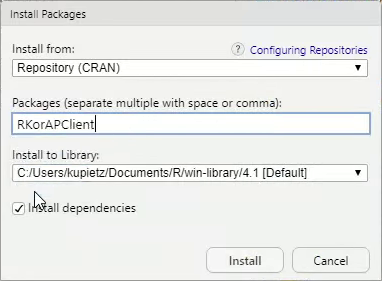
If the installation fails for some reason, you might need to update your installed R packages first (Tools -> Check for Package Updates, Select All, Install Updates).
Or from the command line
Start R, then install RKorAPClient from CRAN (or development version from GitHub or KorAP's gerrit server).
CRAN version:
install.packages("RKorAPClient")
Development version:
remotes::install_github("KorAP/RKorAPClient")
Full installation videos
Mac
Ubuntu
Development and License
RKorAPClient
Authors: Marc Kupietz, Nils Diewald
Contributors: Tim Feldmüller
Copyright (c) 2026, Leibniz Institute for the German Language, Mannheim, Germany
This package is developed as part of the KorAP Corpus Analysis Platform at the Leibniz Institute for German Language (IDS).
It is published under the BSD-2 License.
Further Affected Licenses and Terms of Services
Bundled Assets
The KorAP logo was designed by Norbert Cußler-Volz and is released under the terms of the Creative Commons License BY-NC-ND 4.0.
Highcharts
RKorAPClient imports parts of the highcharter package which has a dependency on Highcharts, a commercial JavaScript charting library. Highcharts offers both a commercial license as well as a free non-commercial license. Please review the licensing options and terms before using the highcharter plot options, as the RKorAPClient license neither provides nor implies a license for Highcharts.
Highcharts is a Highsoft product which is not free for commercial and governmental use.
Accessed API Services
By using RKorAPClient you agree to the respective terms of use of the accessed KorAP API services which will be printed upon opening a connection (KorAPConnection(...).
Contributions
Contributions are very welcome!
Your contributions should ideally be committed via our Gerrit server to facilitate reviewing (see Gerrit Code Review - A Quick Introduction if you are not familiar with Gerrit). However, we are also happy to accept comments and pull requests via GitHub.
Please note that unless you explicitly state otherwise any contribution intentionally submitted for inclusion into this software shall – as this software itself – be under the BSD-2 License.
References
- Diewald, Nils/Barbu Mititelu, Verginica/Kupietz, Marc (2019): The KorAP user interface. Accessing CoRoLa via KorAP. In: On design, creation and use of the Reference Corpus of Contemporary Romanian and its analysis tools. CoRoLa, KorAP, DRuKoLA and EuReCo. Edited by Ruxandra Cosma/Marc Kupietz, 64(3). https://nbn-resolving.org/urn:nbn:de:bsz:mh39-93866.
Kupietz, Marc / Margaretha, Eliza / Diewald, Nils / Lüngen, Harald / Fankhauser, Peter (2019): What’s New in EuReCo? Interoperability, Comparable Corpora, Licensing. In: Bański, Piotr/Barbaresi, Adrien/Biber, Hanno/Breiteneder, Evelyn/Clematide, Simon/Kupietz, Marc/Lüngen, Harald/Iliadi, Caroline (eds.): Proceedings of the International Corpus Linguistics Conference 2019 Workshop "Challenges in the Management of Large Corpora (CMLC-7)", 22nd of July Mannheim: Leibniz-Institut für Deutsche Sprache, 33-39.
Kupietz, Marc / Diewald, Nils / Margaretha, Eliza (2020): RKorAPClient: An R package for accessing the German Reference Corpus DeReKo via KorAP. In: Calzolari, Nicoletta, Frédéric Béchet, Philippe Blache, Khalid Choukri, Christopher Cieri, Thierry Declerck, Sara Goggi, Hitoshi Isahara, Bente Maegaard, Joseph Mariani, Hélène Mazo, Asuncion Moreno, Jan Odijk, Stelios Piperidis (eds.): Proceedings of The 12th Language Resources and Evaluation Conference (LREC 2020). Marseille: European Language Resources Association (ELRA), 7017-7023.
Kupietz, Marc/Diewald, Nils/Margaretha, Eliza (2022): Building paths to corpus data: A multi-level least effort and maximum return approach. In: Fišer, Darja/Witt, Andreas (eds.): CLARIN. The Infrastructure for Language Resources. Berlin: deGruyter, pp. 163–189. https://doi.org/10.1515/9783110767377-007.